---
title: "Text Processing &
Regular Expressions"
subtitle: "Lecture 11"
author: "Dr. Colin Rundel"
footer: "Sta 523 - Fall 2022"
format:
revealjs:
theme: slides.scss
transition: fade
slide-number: true
self-contained: true
execute:
echo: true
---
```{r setup, message=FALSE, warning=FALSE, include=FALSE}
options(
htmltools.dir.version = FALSE, # for blogdown
width=80
)
knitr::opts_chunk$set(
fig.align = "center", fig.retina = 2, dpi = 150,
out.width = "100%"
)
library(stringr)
library(tidyverse)
```
## Base R string functions
As you have likely noticed, the individual characters in a string (element of a character vector) cannot be directly accessed. The base language provides a number helper functions for pattern matching and manipulation of these objects:
- `paste()`, `paste0()` - concatenate strings
- `substr()`, `substring()` - extract or replace substrings
- `sprintf()` - C-like string construction
- `nchar()` - counts characters
- `strsplit()` - split a string into substrings
- `grep()`, `grepl()` - regular expression pattern matching
- `sub()`, `gsub()` - regular expression pattern replacement
- `+` many more - the *See Also* section of the the above functions' documentation is a good place to discover additional functions.
```{r echo=FALSE, fig.align="center" , out.width="33%"}
knitr::include_graphics("https://github.com/rstudio/hex-stickers/raw/master/PNG/stringr.png")
```
## Fixed width strings - `str_pad()`
:::: {.columns .small}
::: {.column width='50%'}
```{r}
str_pad(10^(0:5), width = 8, side = "left") %>%
cat(sep="\n")
```
:::
::: {.column width='50%'}
```{r}
str_pad(10^(0:5), width = 8, side = "right") %>%
cat(sep="\n")
```
:::
::::
## `formatC()` (base)
:::: {.columns .small}
::: {.column width='50%'}
```{r}
cat(10^(0:5), sep="\n")
formatC(10^(0:5), digits = 6, width = 6) %>%
cat(sep="\n")
```
:::
::: {.column width='50%'}
```{r}
cat(1/10^(0:5), sep="\n")
formatC(1/10^(0:5), digits = 6, width = 6, format = "fg") %>%
cat(sep="\n")
```
:::
::::
## Whitespace cleaning - `str_trim()` & `str_squish()`
```{r}
x = c(" abc" , "ABC " , " Hello. World ")
```
```{r}
str_trim(x)
str_trim(x, side="left")
str_trim(x, side="right")
str_squish(x)
```
## String shortening - `str_trunc()`
```{r}
x = "Lorem ipsum dolor sit amet, consectetur adipiscing elit, sed do eiusmod tempor incididunt ut labore et dolore magna aliqua. Ut enim ad minim veniam, quis nostrud exercitation ullamco laboris nisi ut aliquip ex ea commodo consequat. Duis aute irure dolor in reprehenderit in voluptate velit esse cillum dolore eu fugiat nulla pariatur. Excepteur sint occaecat cupidatat non proident, sunt in culpa qui officia deserunt mollit anim id est laborum."
```
```{r}
str_trunc(x, width=60)
str_trunc(x, width=60, side = "left")
str_trunc(x, width=60, side = "center")
```
## String wrapping - `str_wrap()`
```{r}
cat(x)
```
. . .
```{r}
str_wrap(x)
```
##
```{r}
str_wrap(x) %>% cat()
str_wrap(x, width=60) %>% cat()
```
## Strings templates - `str_glue()`
This is a simplified wrapper around `glue::glue()`, use the original for additional control.
:::: {.columns .medium}
::: {.column width='50%'}
```{r}
paste("The value of pi is" , pi)
str_glue("The value of pi is {pi}")
```
:::
::: {.column width='50%'}
```{r}
paste("The value of tau is" , 2*pi)
str_glue("The value of tau is {2*pi}")
```
:::
::::
. . .
::: {.medium}
```{r}
str_glue_data(
iris %>% count(Species),
"{Species} has {n} observations"
)
```
:::
## String capitalization
```{r}
x = "Lorem ipsum dolor sit amet, consectetur adipiscing elit, sed do eiusmod tempor incididunt ut labore et dolore magna aliqua."
```
```{r}
str_to_lower(x)
str_to_upper(x)
str_to_title(x)
str_to_sentence(x)
```
# Regular Expressions
## Regular expression functions
::: {.medium}
| Function | Description |
|:-------------|:------------------------------------|
|`str_detect` | Detect the presence or absence of a pattern in a string. |
|`str_locate` | Locate the first position of a pattern and return a matrix with start and end. |
|`str_extract` | Extracts text corresponding to the first match. |
|`str_match` | Extracts capture groups formed by `()` from the first match. |
|`str_split` | Splits string into pieces and returns a list of character vectors. |
|`str_replace` | Replaces the first matched pattern and returns a character vector. |
|`str_remove` | Removes the first matched pattern and returns a character vector. |
|`str_view` | Show the matches made by a pattern. |
:::
Many of these functions have variants with an `_all` suffix (e.g. `str_replace_all`) which will match more than one occurrence of the pattern in a string.
## Simple Pattern Detection
::: {.medium}
```{r}
text = c("The quick brown" , "fox jumps over" , "the lazy dog")
```
:::
. . .
:::: {.columns .medium}
::: {.column width='50%'}
```{r}
str_detect(text, "quick")
```
:::
::: {.column width='50%'}
```{r}
str_subset(text, "quick")
```
:::
::::
. . .
:::: {.columns .medium}
::: {.column width='50%'}
```{r}
str_detect(text, "o")
```
:::
::: {.column width='50%'}
```{r}
str_subset(text, "o")
```
:::
::::
. . .
:::: {.columns .medium}
::: {.column width='50%'}
```{r}
str_detect(text, "row")
```
:::
::: {.column width='50%'}
```{r}
str_subset(text, "row")
```
:::
::::
. . .
:::: {.columns .medium}
::: {.column width='50%'}
```{r}
str_detect(text, "the")
```
:::
::: {.column width='50%'}
```{r}
str_subset(text, "the")
```
:::
::::
. . .
:::: {.columns .medium}
::: {.column width='50%'}
```{r}
str_detect(
text, regex("quick", ignore_case=TRUE)
)
```
:::
::: {.column width='50%'}
```{r}
str_subset(
text, regex("quick", ignore_case=TRUE)
)
```
:::
::::
## Aside - Escape Characters
An escape character is a character which results in an alternative interpretation of the subsequent character(s). These vary from language to language but for most string implementations `\` is the escape character which is modified by a single following character.
Some common examples:
::: {.medium}
| Literal | Character |
|:--------|:-----------------|
|`\'` | single quote |
|`\"` | double quote |
|`\\` | backslash |
|`\n` | new line |
|`\r` | carriage return |
|`\t` | tab |
|`\b` | backspace |
|`\f` | form feed |
:::
## Examples
:::: {.columns}
::: {.column width='50%'}
```{r error=TRUE}
print("a\"b")
```
:::
::: {.column width='50%'}
```{r error=TRUE}
cat("a\"b")
```
:::
::::
. . .
:::: {.columns}
::: {.column width='50%'}
```{r error=TRUE}
print("a\tb")
```
:::
::: {.column width='50%'}
```{r error=TRUE}
cat("a\tb")
```
:::
::::
. . .
:::: {.columns}
::: {.column width='50%'}
```{r error=TRUE}
print("a\nb")
```
:::
::: {.column width='50%'}
```{r error=TRUE}
cat("a\nb")
```
:::
::::
. . .
:::: {.columns}
::: {.column width='50%'}
```{r error=TRUE}
print("a\\b")
```
:::
::: {.column width='50%'}
```{r error=TRUE}
cat("a\\b")
```
:::
::::
## Raw character constants
As of R 4.0, R has the ability to define raw character sequences which avoids the need for most escape characters using the `r"(...)"` syntax, where `...` is the raw string.
. . .
:::: {.columns}
::: {.column width='50%'}
```{r}
print(
"\\int_0^\\infty 1/e^x"
)
cat(
"\\int_0^\\infty 1/e^x"
)
```
:::
::: {.column width='50%'}
```{r}
print(
r"(\int_0^\infty 1/e^x)"
)
cat(
r"(\int_0^\infty 1/e^x)"
)
```
:::
::::
::: {.aside}
`[]` and `{}` can be used instead of `()` - see `?Quotes` for details
:::
## RegEx Metacharacters
The power of regular expressions comes from their ability to use special metacharacters to modify how pattern matching is performed.
```regex
. ^ $ * + ? { } [ ] \ | ( )
```
. . .
Because of their special properties they cannot be matched directly, if you need to match one you need to escape it first (precede it by `\`).
. . .
The problem is that regex escapes live on top of character escapes, so there needs to use *two* levels of escapes.
. . .
| To match | Regex | Literal | Raw
|----------|-------|-----------|---------
| `.` | `\.` | `"\\."` | `r"(\.)"`
| `?` | `\?` | `"\\?"` | `r"(\?)"`
| `!` | `\!` | `"\\!"` | `r"(\!)"`
## Example
```r
str_detect("abc[def" ,"\[")
```
```
## Error: '\[' is an unrecognized escape in character string starting ""\["
```
. . .
```{r error=TRUE}
str_detect("abc[def" ,"\\[")
```
. . .
How do we detect if a string contains a `\` character?
. . .
```{r}
cat("abc\\def\n")
```
. . .
```{r}
str_detect("abc\\def" ,"\\\\")
```
## XKCD's take
```{r echo=FALSE, fig.align="center" , out.width="80%"}
knitr::include_graphics("imgs/xkcd_backslashes.png")
```
## Anchors
Sometimes we want to specify that our pattern occurs at a particular location in a string, we indicate this using anchor metacharacters.
| Regex | Anchor |
|-------|:----------|
| `^` or `\A` | Start of string |
| `$` or `\Z` | End of string |
| `\b` | Word boundary |
| `\B` | Not word boundary |
## Anchor Examples
```{r}
text = "the quick brown fox jumps over the lazy dog"
```
. . .
```{r}
str_replace(text, "^the" , "---")
```
. . .
```{r}
str_replace(text, "^dog" , "---")
```
. . .
```{r}
str_replace(text, "the$" , "---")
```
. . .
```{r}
str_replace(text, "dog$" , "---")
```
. . .
```{r}
str_replace_all(text, "the" , "---")
```
## Anchor Examples - word boundaries
```{r}
text = "the quick brown fox jumps over the lazy dog"
```
. . .
```{r}
str_replace_all(text, "\\Brow\\B" , "---")
```
. . .
```{r}
str_replace_all(text, "\\brow\\b" , "---")
```
. . .
```{r}
str_replace_all(text, "\\bthe" , "---")
```
. . .
```{r}
str_replace_all(text, "the\\b" , "---")
```
## More complex patterns
If there are more than one pattern we would like to match we can use the or (`|`) metacharacter.
. . .
```{r}
str_replace_all(text, "the|dog" ,"---")
```
. . .
```{r}
str_replace_all(text, "a|e|i|o|u" ,"*")
```
. . .
```{r}
str_replace_all(text, "\\ba|e|i|o|u" ,"*")
```
. . .
```{r}
str_replace_all(text, "\\b(a|e|i|o|u)" ,"*")
```
## Character Classes
When we want to match whole classes of characters at a time there are a number of convenience patterns built in,
| Meta Char | Class | Description |
|:----:|:------------|:-|
| `.` | | Any character except new line (`\n`) |
| `\s` | `[:space:]` | White space |
| `\S` | | Not white space |
| `\d` | `[:digit:]` | Digit (0-9)|
| `\D` | | Not digit |
| `\w` | | Word (A-Z, a-z, 0-9, or _) |
| `\W` | | Not word |
| | `[:punct:]` | Punctionation |
## A hierarchical view
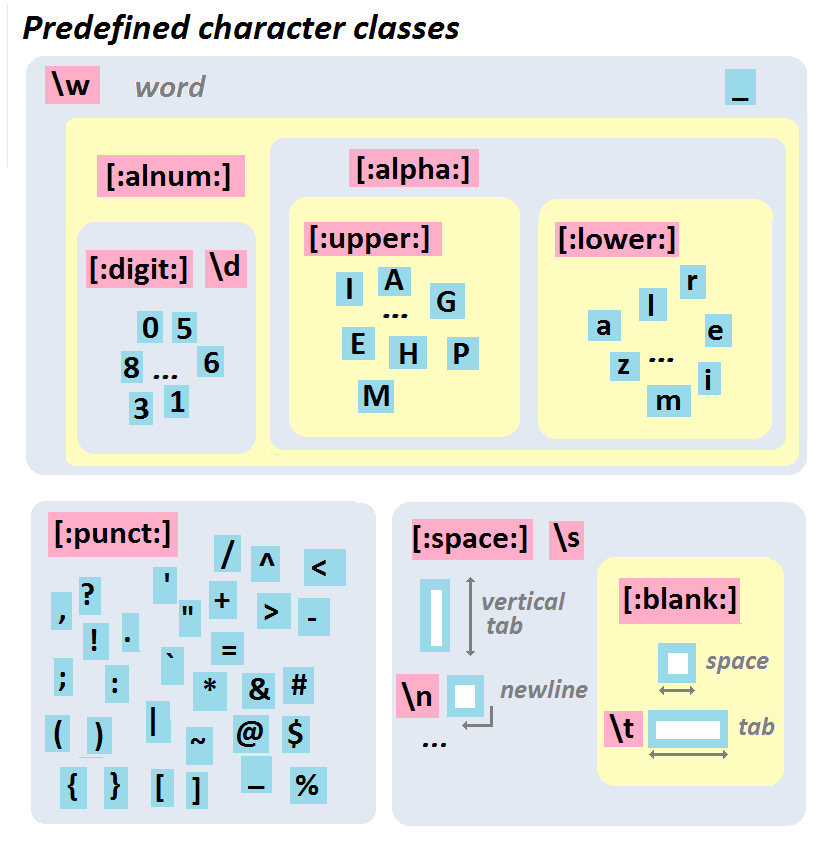 ::: {.aside}
From http://perso.ens-lyon.fr/lise.vaudor/strings-et-expressions-regulieres/
:::
## Example
How would we write a regular expression to match a telephone number with the form `(###) ###-####`?
```{r}
text = c("apple" , "(219) 733-8965" , "(329) 293-8753")
```
. . .
```r
str_detect(text, "(\d\d\d) \d\d\d-\d\d\d\d")
```
```
## Error: '\d' is an unrecognized escape in character string starting ""(\d"
```
. . .
```{r}
str_detect(text, "(\\d\\d\\d) \\d\\d\\d-\\d\\d\\d\\d")
```
. . .
```{r}
str_detect(text, "\\(\\d\\d\\d\\) \\d\\d\\d-\\d\\d\\d\\d")
```
## Classes and Ranges
We can also specify our own classes using square brackets
::: {.aside}
From http://perso.ens-lyon.fr/lise.vaudor/strings-et-expressions-regulieres/
:::
## Example
How would we write a regular expression to match a telephone number with the form `(###) ###-####`?
```{r}
text = c("apple" , "(219) 733-8965" , "(329) 293-8753")
```
. . .
```r
str_detect(text, "(\d\d\d) \d\d\d-\d\d\d\d")
```
```
## Error: '\d' is an unrecognized escape in character string starting ""(\d"
```
. . .
```{r}
str_detect(text, "(\\d\\d\\d) \\d\\d\\d-\\d\\d\\d\\d")
```
. . .
```{r}
str_detect(text, "\\(\\d\\d\\d\\) \\d\\d\\d-\\d\\d\\d\\d")
```
## Classes and Ranges
We can also specify our own classes using square brackets
| Class | Type |
|----------|:------------|
| `[abc]` | Class (a or b or c) |
| `[^abc]` | Negated class (not a or b or c) |
| `[a-c]` | Range lower case letter from a to c |
| `[A-C]` | Range upper case letter from A to C |
| `[0-7]` | Digit between 0 to 7 |
## Example
```{r}
text = c("apple" , "(219) 733-8965" , "(329) 293-8753")
```
. . .
```{r}
str_replace_all(text, "[aeiou]" , "*")
```
. . .
```{r}
str_replace_all(text, "[13579]" , "*")
```
. . .
```{r}
str_replace_all(text, "[1-5a-ep]" , "*")
```
. . .
```{r}
str_replace_all(text, "[^1-5a-ep]" , "*")
```
## Exercises 1
For the following vector of randomly generated names, write a regular expression that,
* detects if the person's first name starts with a vowel (a,e,i,o,u)
* detects if the person's last name starts with a vowel
* detects if either the person's first or last name start with a vowel
* detects if neither the person's first nor last name start with a vowel
```{r echo=FALSE, comment=""}
library(randomNames)
set.seed(124)
dput(randomNames(20, name.order="first.last" , name.sep=" "))
```
## Quantifiers
Attached to literals or character classes these allow a match to repeat some number of time.
| Quantifier | Description |
|:-----------|:------------|
| `*` | Match 0 or more |
| `+` | Match 1 or more |
| `?` | Match 0 or 1 |
| `{3}` | Match Exactly 3 |
| `{3,}` | Match 3 or more |
| `{3,5}` | Match 3, 4 or 5 |
## Example
How would we improve our previous regular expression for matching a telephone number with the form `(###) ###-####`?
```{r}
text = c("apple" , "(219) 733-8965" , "(329) 293-8753")
```
. . .
```{r}
str_detect(text, "\\(\\d\\d\\d\\) \\d\\d\\d-\\d\\d\\d\\d")
```
. . .
```{r}
str_detect(text, "\\(\\d{3}\\) \\d{3}-\\d{4}")
```
. . .
```{r}
str_extract(text, "\\(\\d{3}\\) \\d{3}-\\d{4}")
```
## Greedy vs non-greedy matching
What went wrong here?
```{r}
text = ""
```
```{r}
str_extract(text, ".*
")
```
. . .
If you add `?` after a quantifier, the matching will be *non-greedy* (find the shortest possible match, not the longest).
```{r}
str_extract(text, ".*?
")
```
## Groups
Groups allow you to connect pieces of a regular expression for modification or capture.
| Group | Description |
|-----------------|:-----------------------------------------|
| (a | b) | match literal "a" or "b" , group either |
| a(bc)? | match "a" or "abc" , group bc or nothing |
| (abc)def(hig) | match "abcdefhig" , group abc and hig |
| (?:abc) | match "abc" , non-capturing group |
## Example
::: {.medium}
```{r}
text = c("Bob Smith" , "Alice Smith" , "Apple")
```
:::
. . .
:::: {.columns .medium}
::: {.column width='50%'}
```{r}
str_extract(text, "^[:alpha:]+")
```
:::
::: {.column width='50%'}
```{r}
str_match(text, "^[:alpha:]+")
```
:::
::::
. . .
:::: {.columns .medium}
::: {.column width='50%'}
```{r}
str_extract(text, "^([:alpha:]+) [:alpha:]+")
```
:::
::: {.column width='50%'}
```{r}
str_match(text, "^([:alpha:]+) [:alpha:]+")
```
:::
::::
. . .
:::: {.columns .medium}
::: {.column width='50%'}
```{r}
str_extract(text, "^([:alpha:]+) ([:alpha:]+)")
```
:::
::: {.column width='50%'}
```{r}
str_match(text, "^([:alpha:]+) ([:alpha:]+)")
```
:::
::::
## How not to use a RegEx
Validating an email address:
```
(?:[a-z0-9!#$%&'*+/=?^_`{|}~-]+(?:\.[a-z0-9!#$%&'*+/=?^_`{|}~-]+)*|"
(?:[\x01-\x08\x0b\x0c\x0e-\x1f\x21\x23-\x5b\x5d-\x7f]|\\[\x01-\x09\x0b\x0c\x0e-\x7f])*")
@(?:(?:[a-z0-9](?:[a-z0-9-]*[a-z0-9])?\.)+[a-z0-9](?:[a-z0-9-]*[a-z0-9])?|\\[
(?:(?:25[0-5]|2[0-4][0-9]|[01]?[0-9][0-9]?)\.){3}
(?:25[0-5]|2[0-4][0-9]|[01]?[0-9][0-9]?|[a-z0-9-]*[a-z0-9]:
(?:[\x01-\x08\x0b\x0c\x0e-\x1f\x21-\x5a\x53-\x7f]|\\[\x01-\x09\x0b\x0c\x0e-\x7f])+)\])
```
::: {.aside}
Behold the horror of an old school perl regex for email addresses [here](http://www.ex-parrot.com/~pdw/Mail-RFC822-Address.html)]
:::
## Exercise 2
```{r}
text = c(
"apple" ,
"219 733 8965" ,
"329-293-8753" ,
"Work: (579) 499-7527; Home: (543) 355 3679"
)
```
* Write a regular expression that will extract *all* phone numbers contained in the vector above.
* Once that works use groups to extracts the area code separately from the rest of the phone number.